
Notion as a Project Management Tool: Pros & Cons
Okay, so you’re drowning in a sea of sticky notes, endless email threads, and a project management tool that feels like it’s from the Stone Age? We get it. Juggling tasks, deadlines, and team members can feel like herding cats, especially when you’re trying to keep everything organized. Enter Notion, the all-in-one workspace that’s been making waves in the productivity world. But is it the project management superhero you’ve been waiting for, or just another shiny tool that’ll gather dust on your digital shelf? Let’s dive in and find out.
Notion has become a go-to for many individuals and teams looking for a flexible and customizable workspace. It promises to combine note-taking, task management, databases, and wikis into a single, seamless platform. The hype is real, with many raving about its versatility and ability to adapt to different workflows. But before you jump on the bandwagon, it’s crucial to understand both its strengths and weaknesses as a project management solution. We’re here to give you the lowdown – the good, the bad, and the customizable.
In this article, we’ll explore Notion’s capabilities as a project management tool, weighing its pros and cons. We’ll break down its key features, discuss its strengths in terms of customization and collaboration, and highlight its potential drawbacks concerning complexity and learning curve. By the end, you’ll have a clear understanding of whether Notion is the right fit for your project management needs. Think of it as a friendly guide to help you navigate the Notion universe and decide if it’s the perfect partner for conquering your projects. Let’s get started!
What Exactly is Notion and Why is Everyone Talking About It?
Notion is more than just a note-taking app; it’s a powerful workspace that allows you to create custom dashboards, databases, and wikis. Its flexibility makes it appealing for individuals, small teams, and even larger organizations. Think of it as a digital Swiss Army knife – you can use it for anything from personal to-do lists to complex project tracking.
Key Features that Make Notion Stand Out
- Databases: Create and manage structured data with customizable views (tables, boards, calendars, lists, galleries).
- Pages: Build documents, notes, and wikis with rich text formatting, images, videos, and embedded content.
- Templates: Start with pre-built templates for various use cases, including project management, meeting notes, and personal organization.
- Collaboration: Share pages and databases with team members, assign tasks, and provide feedback.
- Integrations: Connect with other apps like Slack, Google Drive, and Trello to streamline your workflow.
The Allure of Notion: Pros for Project Management
Let’s explore why Notion has captured the hearts (and minds) of so many project managers. Its flexibility and customization options are undoubtedly its biggest selling points.
Unparalleled Customization: Tailoring Notion to Your Exact Needs
One of Notion’s greatest strengths is its ability to be customized to fit your specific project management needs. Unlike rigid, pre-built project management software, Notion allows you to create a workspace that reflects your unique workflow. You can build custom databases, dashboards, and templates tailored to your team’s preferences. This level of flexibility is especially valuable for teams with unconventional processes or those who need to adapt their approach frequently.
Robust Database Capabilities: Organizing Information Your Way
Notion’s database functionality is a game-changer for project management. You can create databases to track tasks, resources, deadlines, and more. The real power lies in the ability to create different views of the same data. For example, you can view tasks as a Kanban board, a calendar, a list, or a table, depending on your preference. This allows you to visualize your project from different angles and gain valuable insights. You can also link databases together to create complex relationships between different aspects of your project, such as linking tasks to specific clients or projects.
Seamless Collaboration: Keeping Everyone on the Same Page
Notion makes collaboration easy and efficient. You can share pages and databases with your team members, assign tasks, and provide feedback directly within the platform. Real-time collaboration ensures that everyone is always on the same page. You can also use comments and mentions to communicate with your team members and keep them informed of progress. Notion’s collaborative features make it an ideal platform for remote teams or teams that need to work together on complex projects.
All-in-One Workspace: Consolidating Your Tools
One of the biggest advantages of Notion is its ability to consolidate multiple tools into a single workspace. Instead of juggling between different apps for note-taking, task management, and document creation, you can do everything within Notion. This streamlines your workflow, reduces distractions, and saves you time. By having all your project-related information in one place, you can easily access it whenever you need it, without having to switch between different applications.
Affordable Pricing: A Budget-Friendly Option
Compared to some of the more established project management tools, Notion offers a relatively affordable pricing structure. They even have a generous free plan that’s suitable for individual users or small teams with basic needs. Paid plans offer more features and storage, but they’re still competitively priced. This makes Notion an attractive option for startups, freelancers, and small businesses on a tight budget.
The Dark Side of Notion: Cons to Consider
While Notion offers a lot of potential, it’s not without its drawbacks. Let’s be honest, nothing’s perfect, and Notion definitely has its quirks.
Steep Learning Curve: Getting Started Can Be Overwhelming
One of the biggest challenges with Notion is its steep learning curve. Its flexibility and customization options can be overwhelming for new users. It takes time and effort to learn how to use Notion effectively and to build a workspace that meets your specific needs. Unlike more intuitive project management tools with a simpler interface, Notion requires you to invest time in learning its intricacies. This can be a barrier to entry for some users, especially those who are not tech-savvy or who are used to more straightforward tools.
Lack of Specialized Project Management Features: Missing Some Key Functionality
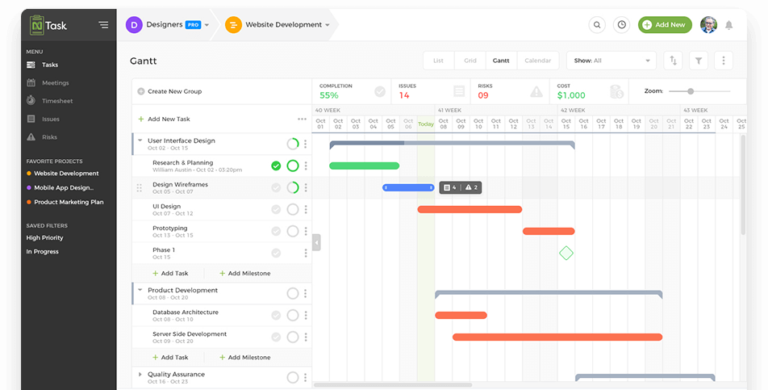
While Notion offers many features that are useful for project management, it lacks some of the specialized functionality found in dedicated project management tools. For example, it doesn’t have built-in Gantt charts, resource management features, or advanced reporting capabilities. This means that you may need to find workarounds or use integrations to achieve the same level of functionality as you would with a dedicated project management tool. For teams with complex project management needs, this can be a significant drawback.
Performance Issues: Can Be Slow and Laggy
Notion can sometimes suffer from performance issues, especially when working with large databases or complex pages. It can be slow to load, laggy to respond, and prone to crashing. This can be frustrating for users and can negatively impact their productivity. While Notion has been working to improve its performance, it’s still an area that needs improvement. If you’re working on a large project with a lot of data, you may experience performance issues that can make it difficult to use Notion effectively. Choosing the right tools is crucial for success, and researching project management platforms Best Project Management Software can significantly impact team collaboration and efficiency
.
Limited Offline Access: Requires an Internet Connection
Notion requires an internet connection to function properly. While it does offer some offline access, it’s limited and not reliable. This can be a problem for users who need to work offline, such as those who travel frequently or who work in areas with poor internet connectivity. If you rely on offline access for your work, Notion may not be the best choice for you.
Over-Customization: The Paradox of Choice
While customization is one of Notion’s greatest strengths, it can also be a weakness. The sheer number of options available can be overwhelming and lead to analysis paralysis. It’s easy to spend too much time customizing your workspace and not enough time actually working on your projects. It’s important to strike a balance between customization and simplicity. Start with a basic setup and gradually add features as needed. Avoid the temptation to over-customize your workspace, as this can make it more difficult to use and maintain.
So, is Notion Right for Your Project Management Needs?
Ultimately, the decision of whether or not to use Notion for project management depends on your specific needs and preferences. If you value flexibility, customization, and an all-in-one workspace, Notion may be a good fit for you. However, if you need specialized project management features, reliable offline access, or a simpler user interface, you may be better off with a dedicated project management tool.
Consider These Questions Before Making a Decision:
- What are your project management needs?
- How important is customization to you?
- How comfortable are you with a steep learning curve?
- Do you need specialized project management features?
- Do you need reliable offline access?
- What is your budget?
By carefully considering these questions, you can make an informed decision about whether or not Notion is the right project management tool for you. Don’t be afraid to experiment with Notion and other tools to find the perfect fit for your team and workflow. Good luck with your project management journey!
Frequently Asked Questions (FAQ) about Notion as a Project Management Tool: Pros & Cons
What are the key advantages and disadvantages of using Notion as a project management tool for small teams?
Notion offers several advantages for small teams seeking a flexible project management solution. Its all-in-one workspace allows teams to centralize tasks, notes, wikis, and databases, fostering collaboration and reducing the need for multiple tools. The customizability of Notion is a major plus, enabling teams to tailor workflows and templates to their specific needs. Notion’s affordability, especially for smaller teams, is also a significant benefit. However, the disadvantages include a steeper learning curve compared to simpler task management apps. The flexibility can also be overwhelming, leading to inconsistencies if not carefully managed. Finally, while Notion is powerful, it may lack some advanced project management features found in dedicated platforms like Jira or Asana, such as robust reporting and resource management.
How does Notion compare to dedicated project management software like Asana or Trello in terms of features and functionality for project tracking?
While Notion can be used for project tracking, it differs significantly from dedicated project management software like Asana or Trello. Asana and Trello are built specifically for project management, offering features like Gantt charts, dependency management, and advanced reporting out-of-the-box. Notion, on the other hand, requires more manual setup to achieve similar functionality. It excels in its flexibility and ability to integrate project tracking with other aspects of team collaboration, like documentation and knowledge bases. However, this flexibility comes at the cost of ease of use for core project management tasks. For example, creating detailed Gantt charts in Notion often involves manual configuration, whereas Asana provides this feature natively. Therefore, the choice depends on the team’s priorities: dedicated project management power versus a more versatile, all-in-one workspace.
What are some practical tips for effectively setting up and using Notion for project management to maximize team productivity?
To maximize team productivity using Notion for project management, start with clear and consistent database structures. Define specific properties for tasks (e.g., status, assignee, due date, priority) and use templates to ensure consistency across all projects. Next, leverage linked databases to create different views of the same data – a Kanban board for task progress, a calendar view for deadlines, and a table view for detailed information. Establish clear naming conventions for pages and databases to improve searchability. Integrate regularly used tools and automate repetitive tasks using Notion’s API or third-party integrations. Finally, encourage team members to actively use Notion for communication and documentation, creating a central hub for all project-related information. Regularly review and refine your Notion setup based on team feedback to ensure it continues to meet evolving needs.


